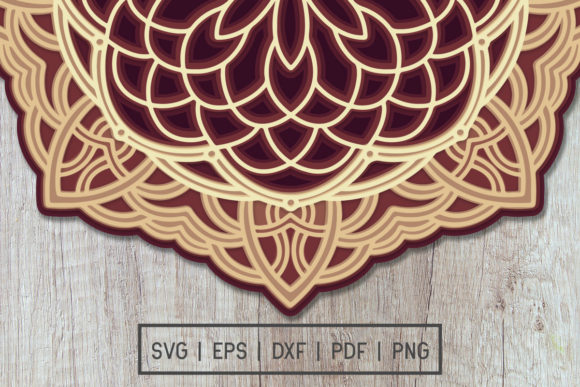
Multilayer 3D Mandala Cut File Design: Avoiding Pitfalls for Professional Results
If you are looking to add depth and dimension to your crafting projects, a Multilayer 3D Mandala Cut File Design offers a sophisticated solution that transforms flat paper into a stunning visual centerpiece. These intricate designs are not merely decorative; they represent a strategic approach to creating layered art that catches the light and draws the eye. However, the gap between a digital download and a finished masterpiece often lies in how the file is handled after purchase. Many creators rush into cutting without understanding the specific requirements of multilayer files, leading to misaligned layers, wasted materials, and frustrated results.
The allure of these designs is undeniable. Whether you are a hobbyist building a home decor piece or an entrepreneur preparing inventory for a boutique shop, the ability to produce high-quality, dimensional art is a significant asset. Yet, the process involves more than just hitting the "cut" button on your machine. It requires a clear understanding of the file formats provided, the extraction process, and the precise assembly techniques needed to achieve the intended three-dimensional effect.
Understanding What You Actually Receive
One of the most common misunderstandings occurs right at the moment of purchase. When you acquire a Multilayer 3D Mandala Cut File Design, you are buying a digital product, not a physical object. No cardstock, glue, or pre-cut pieces will be shipped to your door. Instead, you will receive a ZIP folder containing the raw data necessary to bring the design to life. This distinction is critical because it places the responsibility of preparation entirely on you.
The package typically includes a comprehensive set of file formats designed to ensure compatibility with various software and cutting machines. Specifically, you will receive SVG, DXF, EPS, PNG, and PDF files. Each format serves a unique purpose in the workflow:
- SVG files are the industry standard for modern cutting machines like Cricut and Silhouette, preserving vector paths and layer information.
- DXF files are essential for users working with AutoCAD or older laser cutter software.
- EPS files offer robust compatibility with professional design tools like Adobe Illustrator and CorelDRAW.
- PNG and PDF files provide raster previews and print-ready documents for reference or alternative production methods.
A frequent error made by beginners is attempting to open the ZIP file directly within their cutting software without extracting it first. Cutting plotters cannot read compressed archives. You must extract the contents to a dedicated folder on your computer before the software can recognize the individual layers. Failing to do this results in error messages that often confuse new users, who may mistakenly believe the file is corrupted rather than simply compressed.
Common Mistakes That Compromise Your Project
Even with the correct files in hand, the path to a successful project is fraught with potential pitfalls. One of the most damaging mistakes is ignoring the scale of the artwork. The design you are downloading is approximately 12 x 12 inches. While this size is versatile, it does not automatically mean it fits every frame or project requirement. If you intend to fit this mandala into a smaller shadow box or a specific wall arrangement, you must resize the layers in your design software before cutting. Attempting to force a 12-inch design into a smaller space without adjusting the settings can result in cutters missing edges or machines running out of material mid-job.
Another significant issue arises from poor layer management. A multilayer design relies on the precise stacking order of its components. In many cases, users import all layers as a single group or fail to separate them by color or shape. This oversight leads to cutting errors where different layers are cut from the same sheet simultaneously, making it impossible to assemble the 3D structure later. To avoid this, always verify that your software recognizes each layer as a distinct entity. Check the layer panel to ensure that the background, middle layers, and top accents are separated correctly.
Material selection is also a critical factor often overlooked. Because the design is intended to be 3D, the stiffness and weight of the cardstock matter immensely. Using flimsy paper that bends under its own weight will cause the layers to collapse, ruining the dimensional effect. Conversely, using cardstock that is too thick may prevent the layers from nesting properly, resulting in a bulky, uneven finish. For best results, choose cardstock with a medium weight (around 65–80 lb) that holds its shape but remains flexible enough to adhere smoothly.
Ensuring Precision and Quality
To maximize the quality of your final output, you must treat the digital file as a blueprint rather than a finished product. Before sending anything to your cutter, perform a test run. Create a small mock-up using scrap paper to check the alignment of the layers. This step is invaluable for catching issues such as overlapping lines or incorrect spacing that might not be obvious on a screen. A quick test saves hours of frustration and prevents the waste of expensive materials.
When assembling the mandala, pay close attention to the adhesive application. Applying too much glue can cause the paper to warp or bleed through thin layers, while too little glue will result in a fragile structure that falls apart easily. Use a precision applicator or a foam brush to apply a thin, even layer of adhesive. Start from the center of the design and work your way outward to ensure there are no air bubbles trapped between the layers.
For those using laser cutters, the settings differ significantly from electronic cutting machines. Laser cutters rely on power and speed settings that vary based on the material thickness. If you attempt to use settings meant for paper on thicker cardstock, you risk burning the edges or failing to cut through completely. Always consult the manufacturer's guidelines for your specific machine and material combination before starting the job.
Maximizing Value and Versatility
Once you have mastered the basics, the versatility of a Multilayer 3D Mandala Cut File Design becomes apparent. These designs are not limited to simple wall hangings. They can be adapted for wedding invitations, gift tags, scrapbook embellishments, and even commercial signage. By understanding the underlying structure of the file, you can customize colors, adjust sizes, and modify elements to suit your specific brand or event theme.
However, remember that the success of any adaptation depends on the integrity of the original file. Since you receive multiple formats, you have the flexibility to edit the design in various software environments. If you need to change the color scheme, work in the SVG or EPS file where colors are editable vectors. If you need to print the design as a template, use the PDF version. Having access to these diverse formats ensures that you are never locked into a single workflow.
In conclusion, while the process of creating 3D mandala art requires patience and attention to detail, the results are well worth the effort. By avoiding common mistakes related to file extraction, layer separation, and material selection, you can produce professional-grade art that stands out. Take the time to understand the specifications of your download, respect the dimensions of the artwork, and follow a methodical assembly process. With the right approach, your Multilayer 3D Mandala Cut File Design will serve as a testament to your skill and creativity, adding a touch of elegance to any space or project.